Adding a car to a live server goes smoother with a plan. This Buffalo TTX FiveM setup guide walks through the Buffalo TTX from purchase to first test drive. It also covers when this lighter Buffalo is the better pick.
What you are installing
The Buffalo TTX is a single lore-friendly vehicle resource. The listing calls it a FiveM Bravado Buffalo, a custom TTX build for modern street presence. Bravado is a GTA V make, so the body carries no real-world badges.
| Spec | Detail |
|---|---|
| Polygon count | 119,172 polys |
| Resource size | 13.5 MB |
| Tuning parts | 60+ |
| Seats | 4 |
| Protection | CFX.re Asset Escrow |
| Editable assets | YMT + YTD |
| Server build | FXServer 5181 or above |
| Frameworks | Standalone, works with QBCore, ESX, vRP and custom frameworks |
Before you start
- Check your server build. The listing asks for FXServer 5181 or above.
- Know your framework. The car is standalone, but it is listed as working with QBCore, ESX and vRP.
- Check your streaming budget. This car adds 13.5 MB to your resources.
- Have access to the cfx.re account you will buy with.
Buffalo TTX FiveM setup guide: step by step
The listing describes a drag-and-drop resource that starts from server.cfg. Here is that flow in order.
- Buy the car. The listing says delivery goes to your cfx.re account through CFX Portal.
- Download the asset from your cfx.re account.
- Copy the resource folder into your server resources folder.
- Open server.cfg and add an ensure line with the resource folder name.
- Restart the server so the resource starts.
- Join the server and spawn the car to check that it loads.
Keep the folder name and the ensure line the same. If the names do not match, the resource will not start.
If the car does not appear
- Check the server console for errors when the resource starts.
- Make sure the ensure line is spelled the same as the folder.
- Confirm your server build is FXServer 5181 or above.
- Check that the server key belongs to the cfx.re account that bought the car.
Working with Escrow
The car uses CFX.re Asset Escrow. The listing notes the YMT and YTD files as editable. Escrowed resources need to run on a server key from the same cfx.re account that owns them.
After the first spawn
Once the car loads, a few quick checks help before players get it.
- Open your tuning menu and look through the 60+ custom tuning parts.
- Test the breakable glass and bodyshell collisions with a small crash.
- Sit in all 4 seats and check the interior dials.
- Try a custom livery. The listing says the car is livery mapping ready with a complete UV layout.
- Add it to your dealership, garage or job scripts as needed.
The listing does not give speed or handling numbers. Your test drive is the moment to judge those for your own server.
Why pick a lore-friendly Buffalo
Bravado and Buffalo are both names from the GTA V world. Adding this car keeps a city in line with in-universe makes and no real-world badges. For the full idea, read our guide on what lore friendly cars are in FiveM.
What the photos show
The cover shows the Buffalo TTX in lime green with a tall rear wing, speeding down a city street. A second lime green shot shows the front three-quarter view with motion blur.
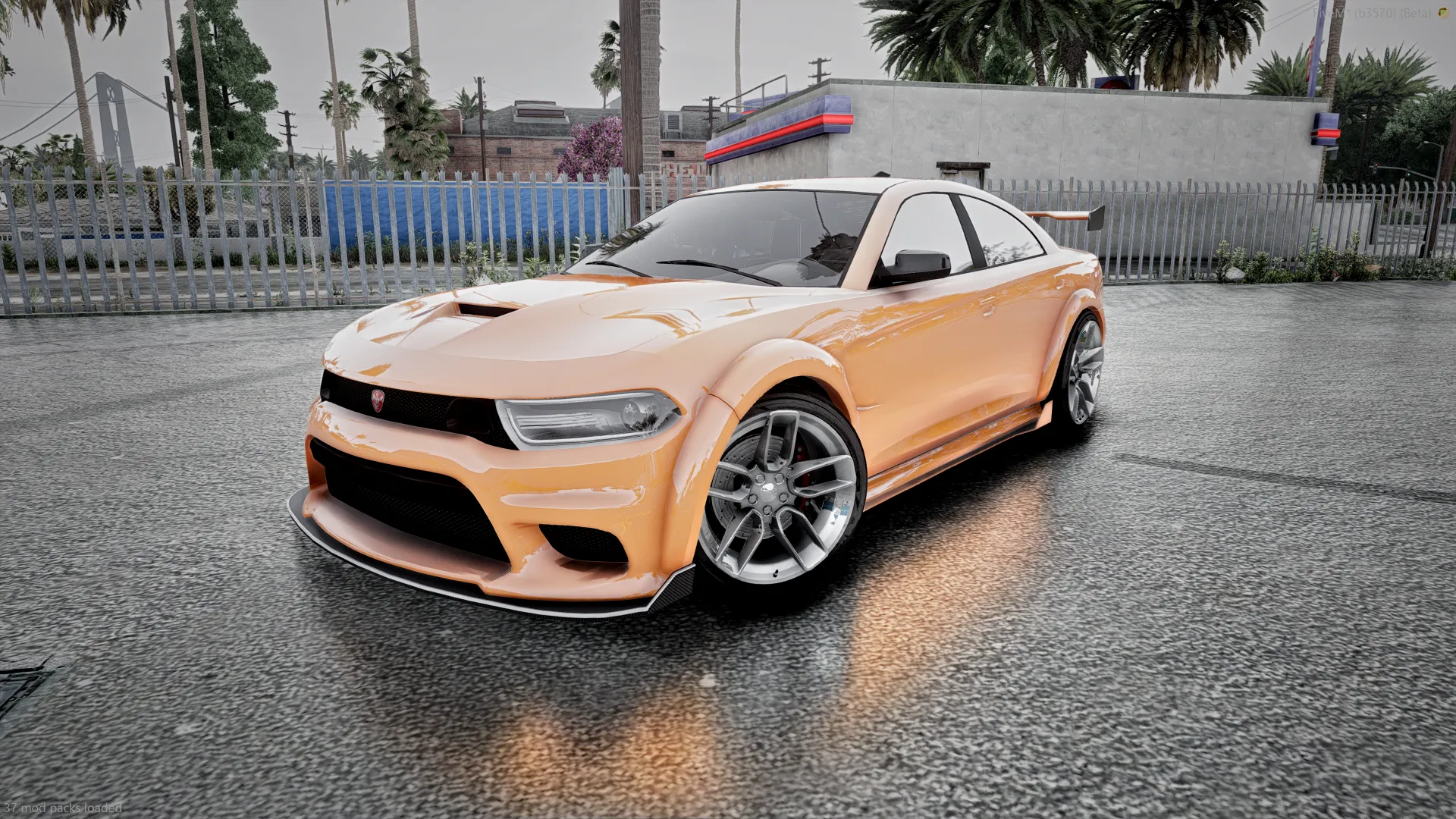
The other photos change the look. One is silver with a front splitter and multi-spoke wheels at a palm-lined car wash. One is orange with a raised rear wing on a rainy street. The last is metallic orange with chrome wheels on wet asphalt by a fence.
This listing has no main video, so the photo strip under the post is the best look at the car.
TTX or the high-detail Buffalo?
The Buffalo TTX page points to a second Buffalo option. The Bravado Buffalo TTS 15 carries 170k polys. The TTX sits at 119,172 polys and 13.5 MB.
Choose the TTX when your server already streams many cars. It still has 60+ tuning parts, which is a lot of choice for a lighter build. Choose the TTS 15 when detail up close matters more.
Buffalo TTX FAQ
Does the Buffalo TTX need a framework?
No. It is standalone and listed for QBCore, ESX, vRP and custom frameworks.
Which server build do I need?
FXServer 5181 or above.
How many seats does it have?
It has 4 seats, with working interior dials.
How many tuning parts does it have?
The listing states 60+ custom tuning parts, covering bumpers, spoilers, side skirts and body parts.
Is there a video?
Not on this listing. Use the photo strip under this post to see the car.
Can I use it on another community?
Your rights cover a single community for servers you own. Resale and sharing are not allowed.
Ready to set it up?
That wraps up this Buffalo TTX FiveM setup guide. When your server is ready, get the car from the Buffalo TTX page, then follow the steps above. For more in-universe cars, browse the lore-friendly vehicle list.